Variables and tables
The variables pane lists the objects in your session after every command. View() opens any table in a viewer that asks DuckDB for one page at a time, so a table with millions of rows opens at once.
The variables pane
The pane under the console updates after every command, yours or Claude's, and follows the console when you restart R or switch to Python. It lists your objects, including plots saved in variables (ggplot, lattice, patchwork).
The objects are sorted into five tabs: Data (data frames), Plots (plot objects), Values, Functions and Other. Move between them with ← →, Tab, the keys 1 to 5, or a click. / searches.
Enter on an object
| Object | What Enter does |
|---|---|
| A data frame | Opens the table in the viewer, like View(). m opens it in Mirador instead. |
| A plot object | Draws it and opens it in Mirador. A plot that is already drawn opens without being drawn again. |
| Anything else, in R | Runs str() on it in the console. |
| A function, in Python | Shows its help in the console (name?). |
| Anything else, in Python | Prints it in the console. |
The history of everything you drew isn't in this pane: it is in Mirador (ctrl+b f).
A bigger view
ctrl+b d (corral vars) opens the variables over the terminal, with the same keys; q closes it. If your layout has no variables pane, corral vars --split adds one under the R console.
Objects with more than a million elements don't show their size in memory, because computing it after every command would be slow. To stay fast, Corral describes a variable again only when the object changed (another address in memory, another length, other dimensions or, in tables, other column types).
Variables for agents
$ corral vars --json
$ corral vars --json --lang python
This prints the objects in the session (name, kind, class, dimensions or a preview, size) as JSON, without typing anything in the console. Without --lang it lists the console in view. Corral's skill tells Claude to use it before running code, so it doesn't guess names or overwrite your objects.
The table viewer
View(df) (in R or in Python), Enter on a data frame in the variables pane, or corral view on a file open the table over the terminal, in a viewer that queries the file with DuckDB.
The session saves the table as parquet, and the viewer asks DuckDB only for what is on screen: a page of rows, the row count, a sort or a search are each a query of a few milliseconds. A table of 10 million rows shows its first screen in about 34 ms, and the viewer itself uses about 3 MB.
 ▸▸ sales                                                                           10,000,000 rows · 7 columns

           order_id  date        region   product    units    price   revenue
            integer  date        varchar  varchar   integ…   double    double

        1         1  2025-12-09  East     Headset        7   241.42   1689.94
        2         2  2024-09-14  West     Monitor        3   848.36   2545.08
        3         3  2024-08-17  East     Dock          11  1335.13  14686.43
        4         4  2024-10-07  South    Headset        1  1231.24   1231.24
        5         5  2025-12-03  South    Laptop         3   650.69   1952.07
        6         6  2025-07-07  North    Webcam         2   716.53   1433.06
        7         7  2025-03-28  South    Keyboard       5    532.7    2663.5
        8         8  2024-09-05  West     Dock           1   657.58    657.58
        9         9  2025-09-22  West     Keyboard      11   559.68   6156.48
       10        10  2025-12-29  West     Keyboard      10   690.15    6901.5
       11        11  2025-03-30  West     Dock           9   791.22   7120.98
       12        12  2025-04-26  Central  Monitor        2   534.37   1068.74
       13        13  2025-10-22  North    Keyboard       4  1092.59   4370.36
       14        14  2025-07-17  North    Monitor        8   106.77    854.16
       15        15  2024-06-04  West     Webcam        12  1068.48  12821.76
       16        16  2024-06-30  East     Monitor        7  1485.02  10395.14
       17        17  2024-06-13  North    Headset        8  1421.45   11371.6
       18        18  2025-04-22  West     Keyboard       3    688.5    2065.5
       19        19  2024-01-11  South    Mouse          5  1734.62    8673.1
       20        20  2024-08-25  West     Monitor        3   1070.4    3211.2
 / search · f filter · = equal to the cell · x clear filters · s sort · Enter row · i summary · m Mirador · Sh…
$ corral view data/sales.parquetcorral view opens parquet, CSV and JSON files; --title sets the title. In Python, View() takes pandas, polars or pyarrow tables. In R, it writes parquet with nanoparquet or arrow; without either, it uses CSV.
Keys
| Key | Action |
|---|---|
| ↑ ↓, PgUp PgDn, g G | Move through the rows (the mouse wheel too) |
| ← →, 0 $ | Move through the columns; with the mouse, the horizontal wheel, a sideways swipe on the trackpad, or Shift and the wheel |
| s (or a click on the header) | Sort by the column: ascending, descending, unsorted |
| / | Search a text in every column; / and an empty Enter clear the search |
| f | Filter with a condition; it starts with the name of the current column |
| = | Keep only the rows with the value of the selected cell |
| x | Remove every filter and the search |
| Enter | See the whole row |
| i | Summary of each column (DuckDB's SUMMARIZE) |
| m | Open the table in Mirador, in your browser; the viewer stays open |
| q | Close |
Filters
A filter takes R or DuckDB's SQL:
mpg > 20 & cyl == 6
region %in% c("a", "b")
!is.na(x)
region LIKE 'nor%'
Filters add up, with each other and with the search, and the top line says which ones are active and how many rows are left. If a filter has an error, it isn't applied, and DuckDB says why.
Tables in Mirador
The terminal is the default, and Mirador opens a table only when you ask, for example when you want more room for a wide one. Any of these does it:
- m in the table viewer, or on a data frame in the variables pane;
View(df, mirador = TRUE)in R,View(df, mirador=True)in Python;corral view FILE --mirador.
Mirador opens the same file in a tab of its own, and the table works as in the terminal, with the same DuckDB queries and the same keys: / searches, f adds a filter in R or SQL, = keeps the rows equal to the selected cell, s sorts (a click on a header too), x clears, Enter shows the whole row and i the summary. Each filter shows as a label you can remove with its ×, and the top line says how many rows are left. Every tab keeps its filters, sort and position while you look at another one.
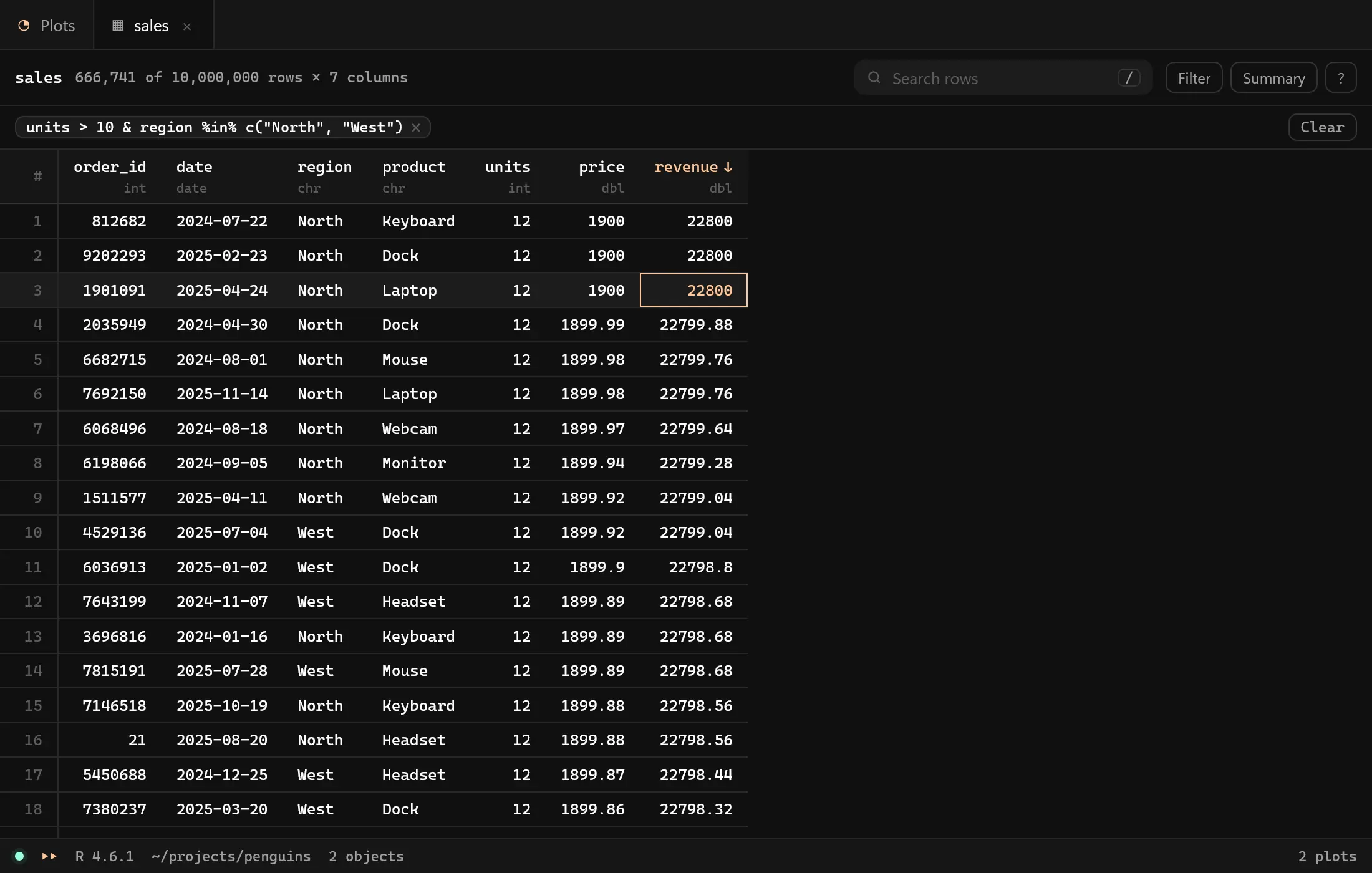
Outside herdr, View() opens tables in Mirador when Mirador is running; CORRAL_VIEW changes that (see Configuration).
Tables from View() are saved in R's (or Python's) temporary folder, and they go away when you close the console.
VisiData instead
If you prefer VisiData and have it installed (vd), tables open there, with Corral's colors:
$ corral config table_viewer visidataAny other value, such as corral, goes back to Corral's viewer. To use a viewer of your own, set CORRAL_TABLE_VIEWER to its command; {file} is replaced by the table's path.